Follow every beverage from plan to payment.
Plan production, make it, package it, track what you have, move it, sell it, get paid, report on it, and file it. Then feed what you learned back into the next plan.
One system, however many places you make and store your product.
In Bev Deck every site is a record in its own right: each one is configured for the work that actually happens there, and every production batch, inventory movement, order, and report carries the facility it belongs to.
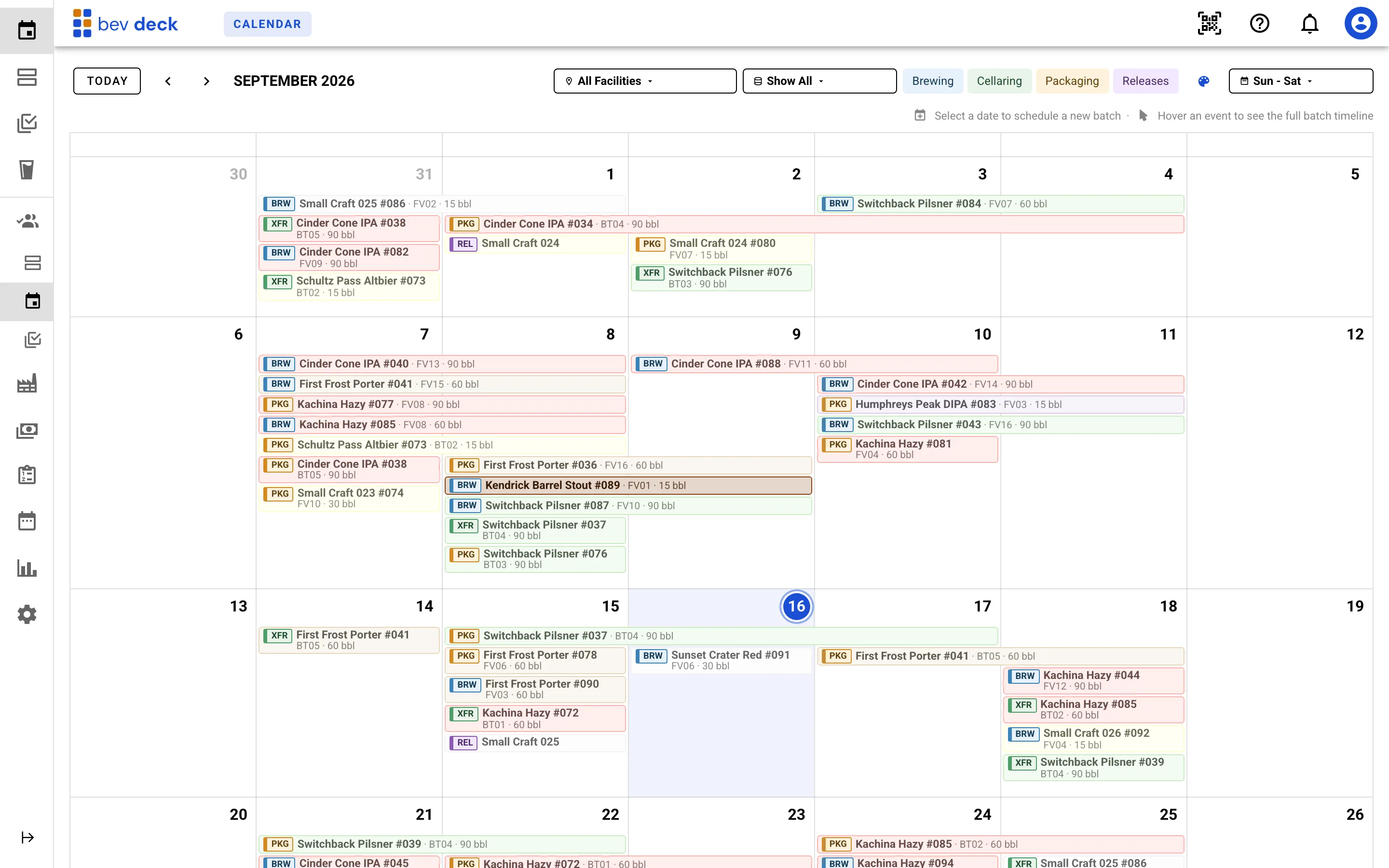
See the week, open the work.
Production runs, packaging, transfers, and releases sit on one calendar, colored by product and filtered by facility. The same records drive a chronological agenda for the day ahead and a top-down map of what is in every tank right now, so nobody keeps a private copy of the schedule.
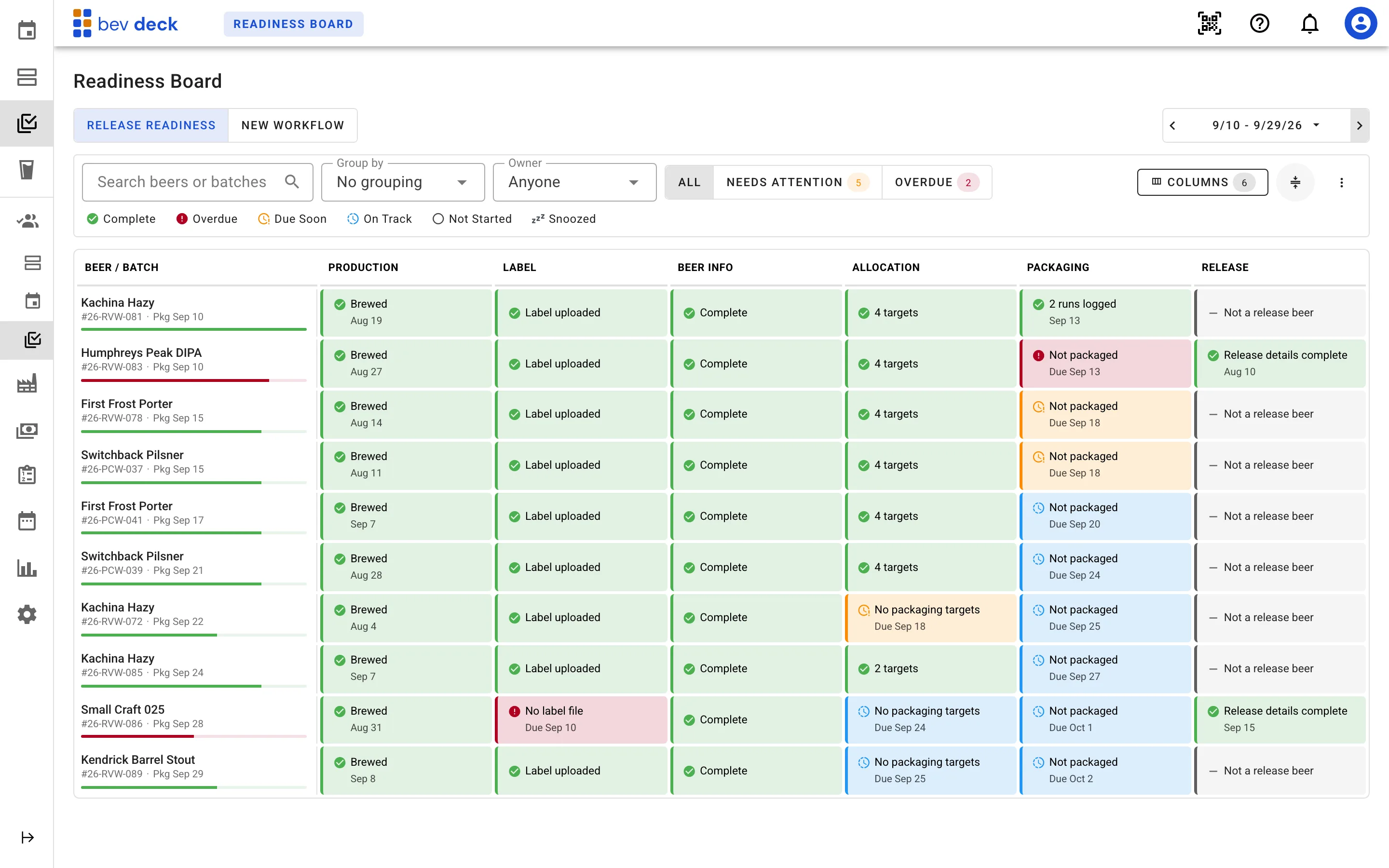
Get sales and marketing involved in the release before it ships.
Getting a new product out the door takes production, marketing, sales, and logistics each finishing their part in the right order. The readiness board puts every product in the window on a row and every one of those inputs in a column, so the thing actually holding up the release is a red cell everyone sees.
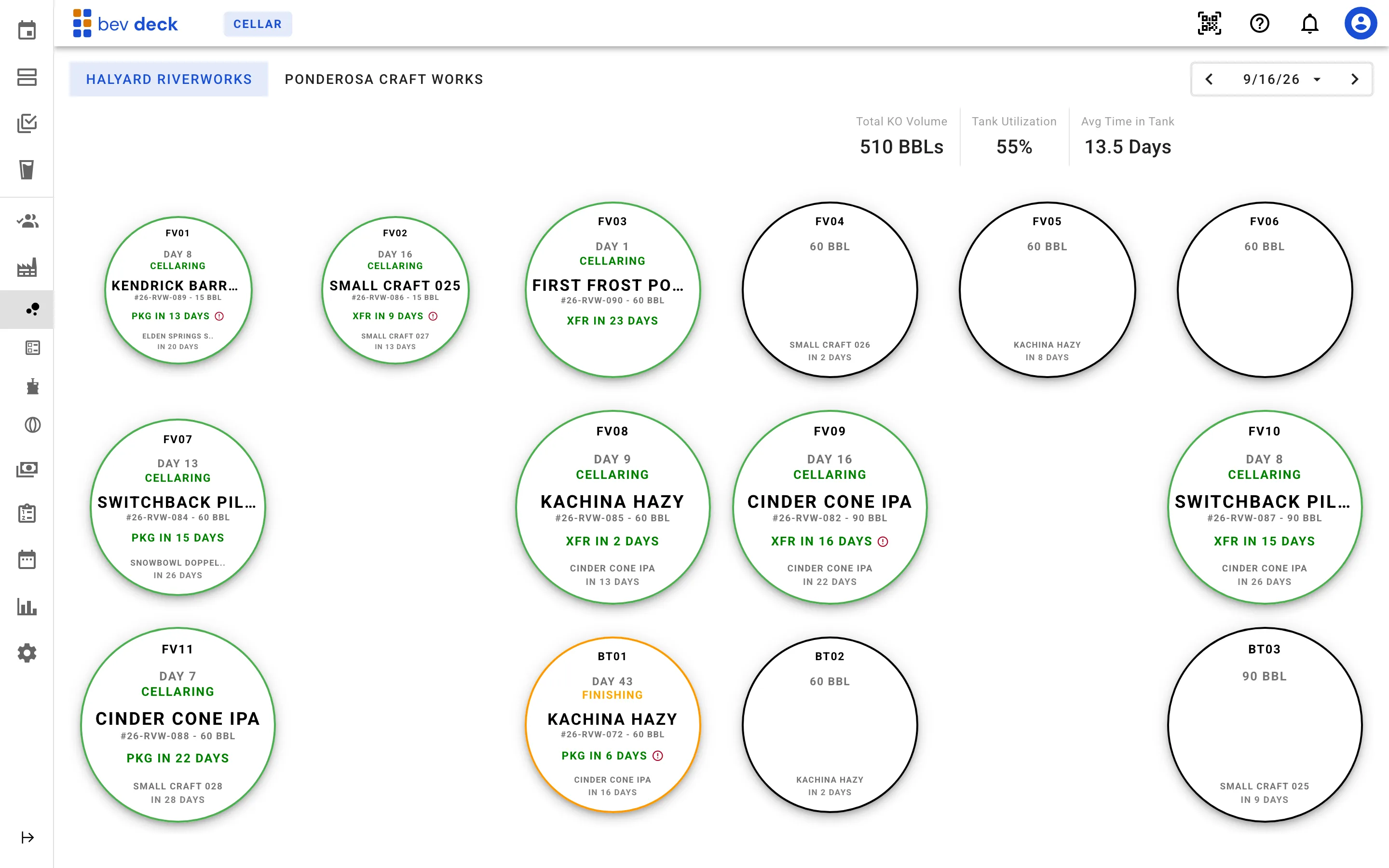
Track production batches from planned work to finished product.
Whether product is made in-house or coordinated with a contract facility, batch activity stays connected to the rest of the operation. The cellar reads as a top-down map rather than a list: every fermenter and brite tank, what is in it, and how long it has been there.
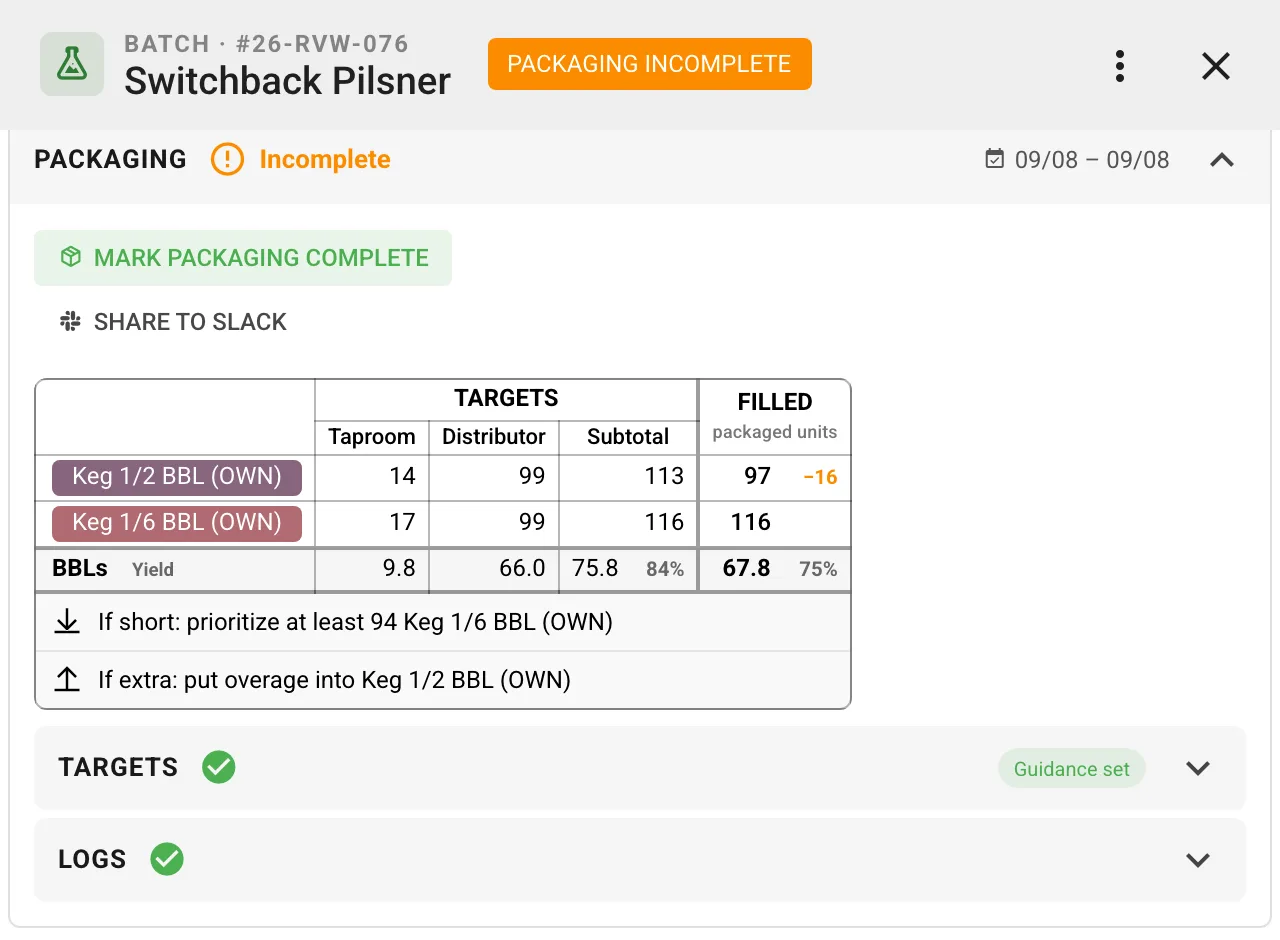
Package what sales already promised.
Set packaging targets by channel before the run, share them to Slack so the crew sees the same plan, and let Bev Deck carry the call on what to cut and what to fill when the tank comes in short or long.
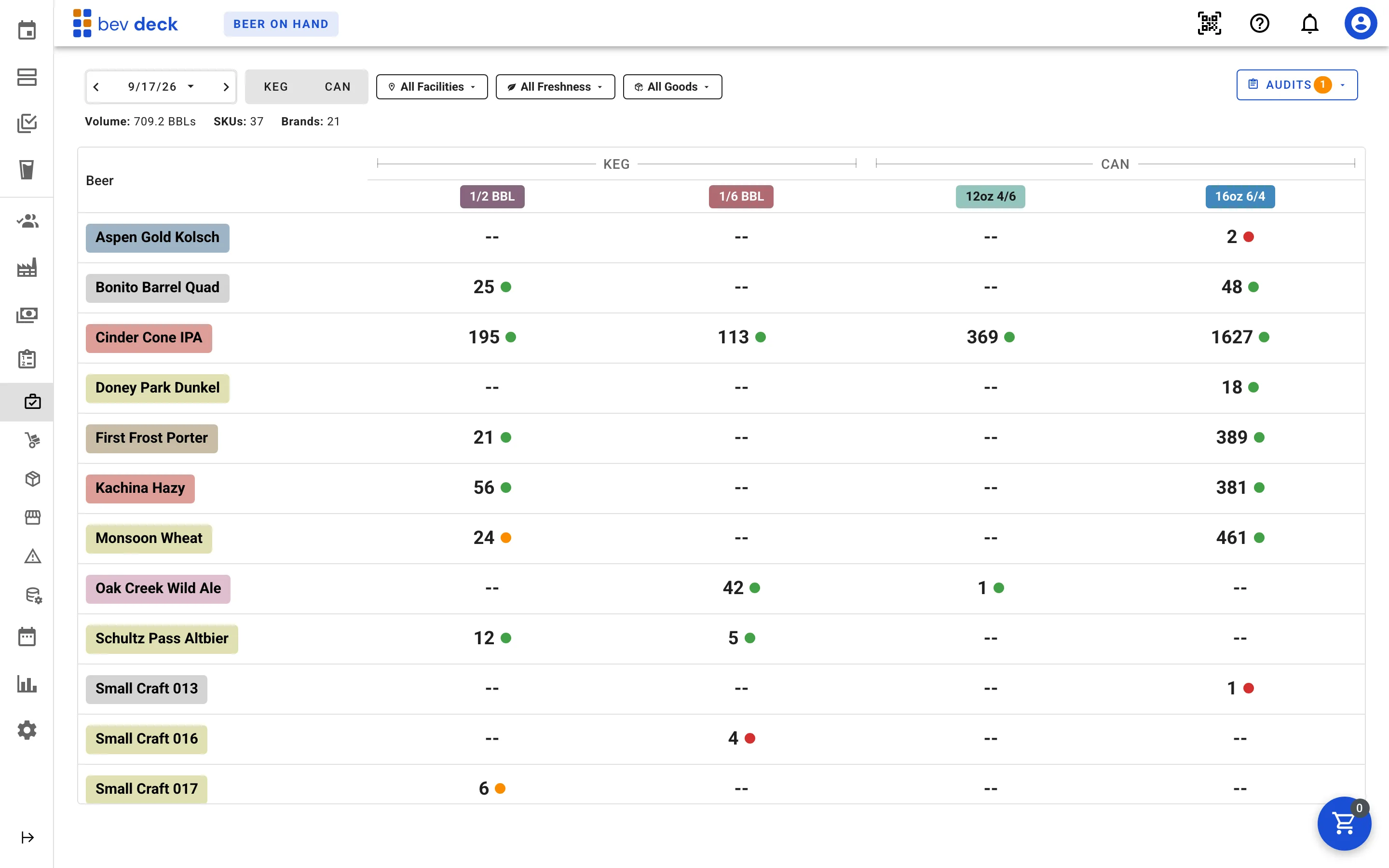
Know what is on hand, where it is, and how old it is.
Finished goods are tracked by date-coded lot, so the on-hand grid shows count and freshness.
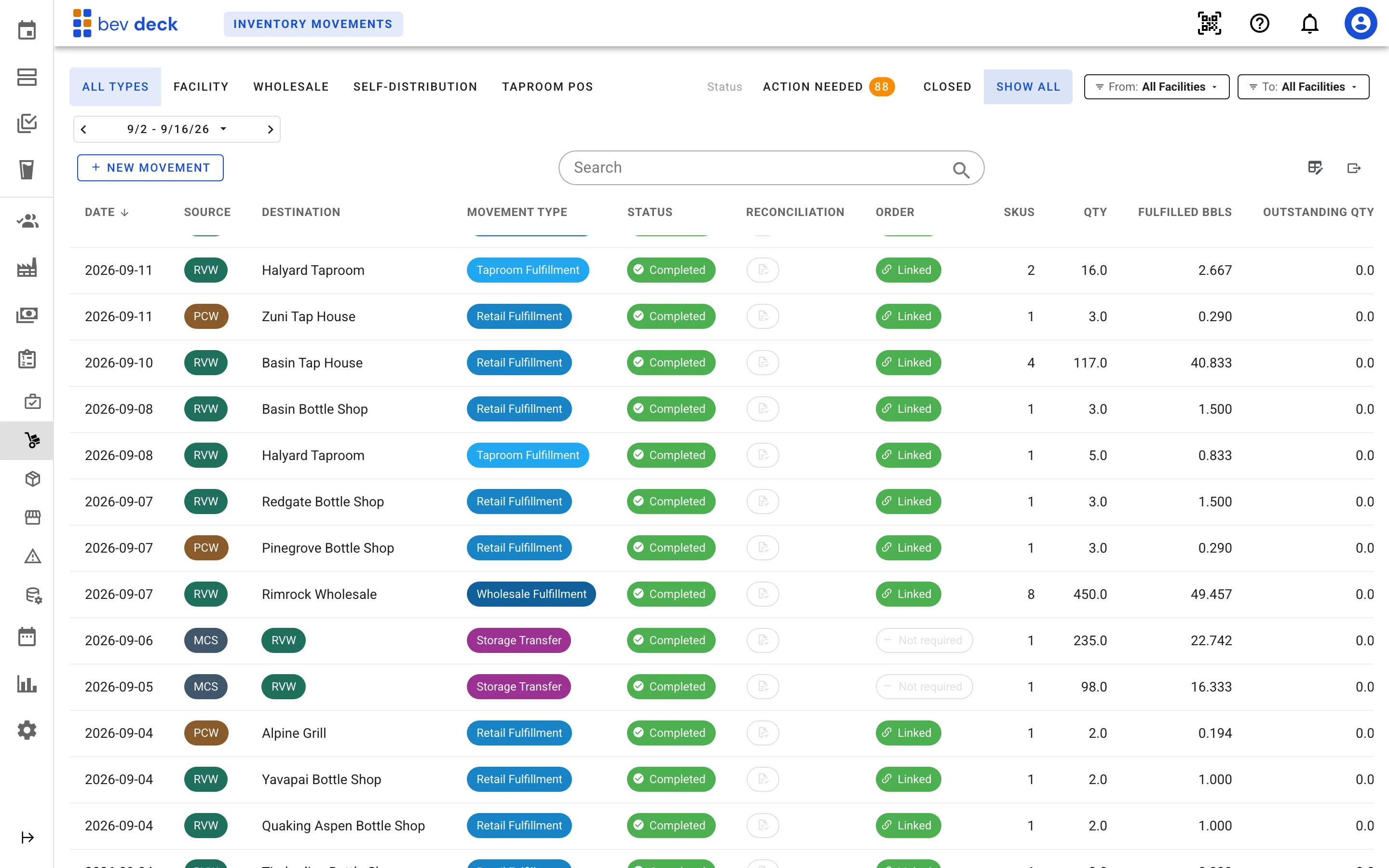
A shipment is never held up by paperwork that has not caught up.
Transfers between facilities, sub-locations, taprooms, and 3PL are all one document type, so a pallet moving anywhere is the same record. When the book and the floor disagree, the movement still goes out: the exception is recorded against it, and the correction can be made from whichever screen you are already in rather than by unwinding the shipment.
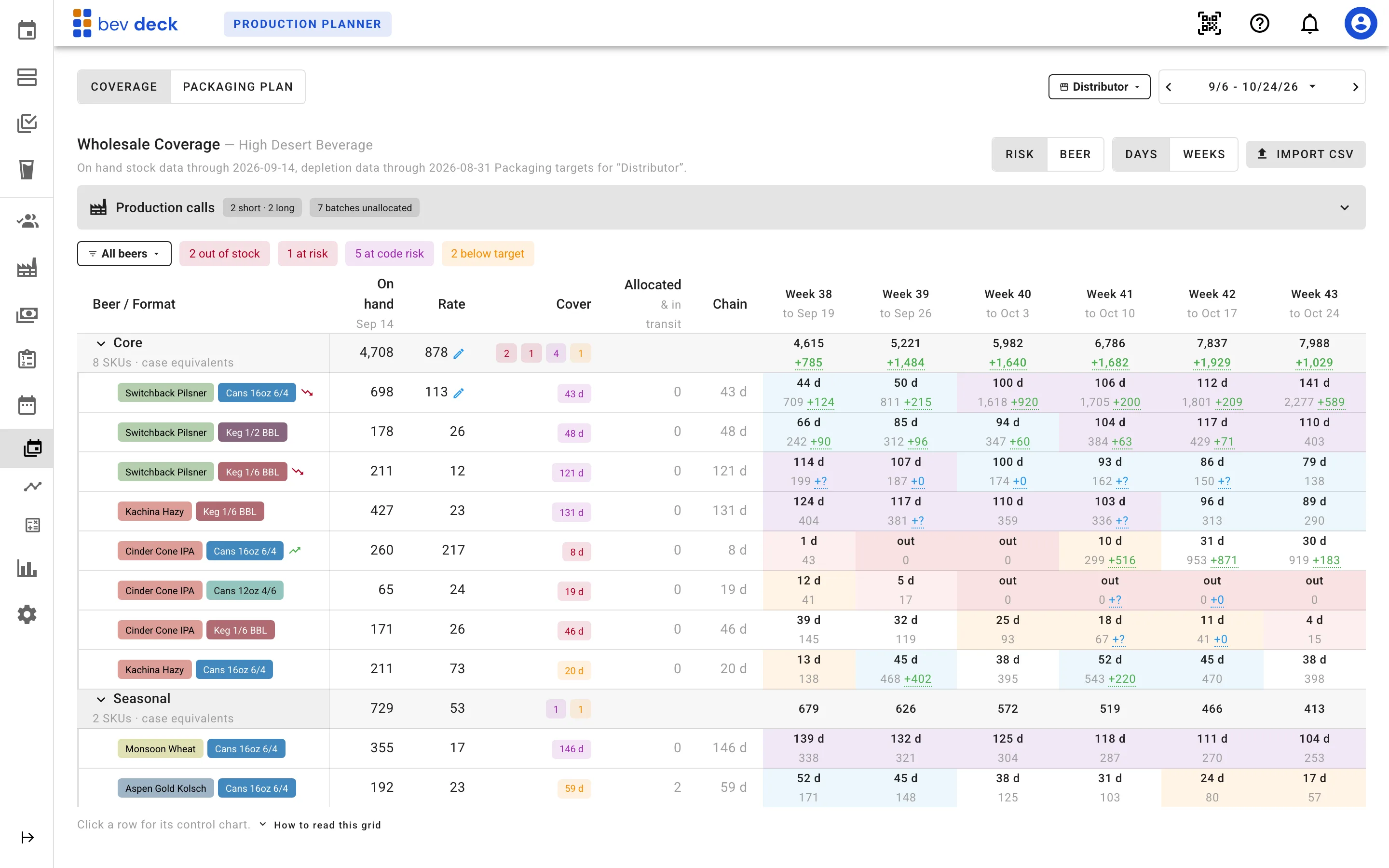
Decide what to package next with the whole chain in view.
Coverage reads recent sell-through against the stock that is actually on hand, then projects it forward week by week against the production plan. Potential out-of-stocks and overstocks surface in time to adjust the plan.
From order to paid invoice without re-keying anything.
An order carries its own pricing and its allocated lots, and the invoice is projected from the order itself. QuickBooks stays the accounting system: Bev Deck re-prices the order against your current price lists every time you open the sync dialog and tells you whether the invoice already sitting in QuickBooks still matches — before you send anything, not after a customer queries it.
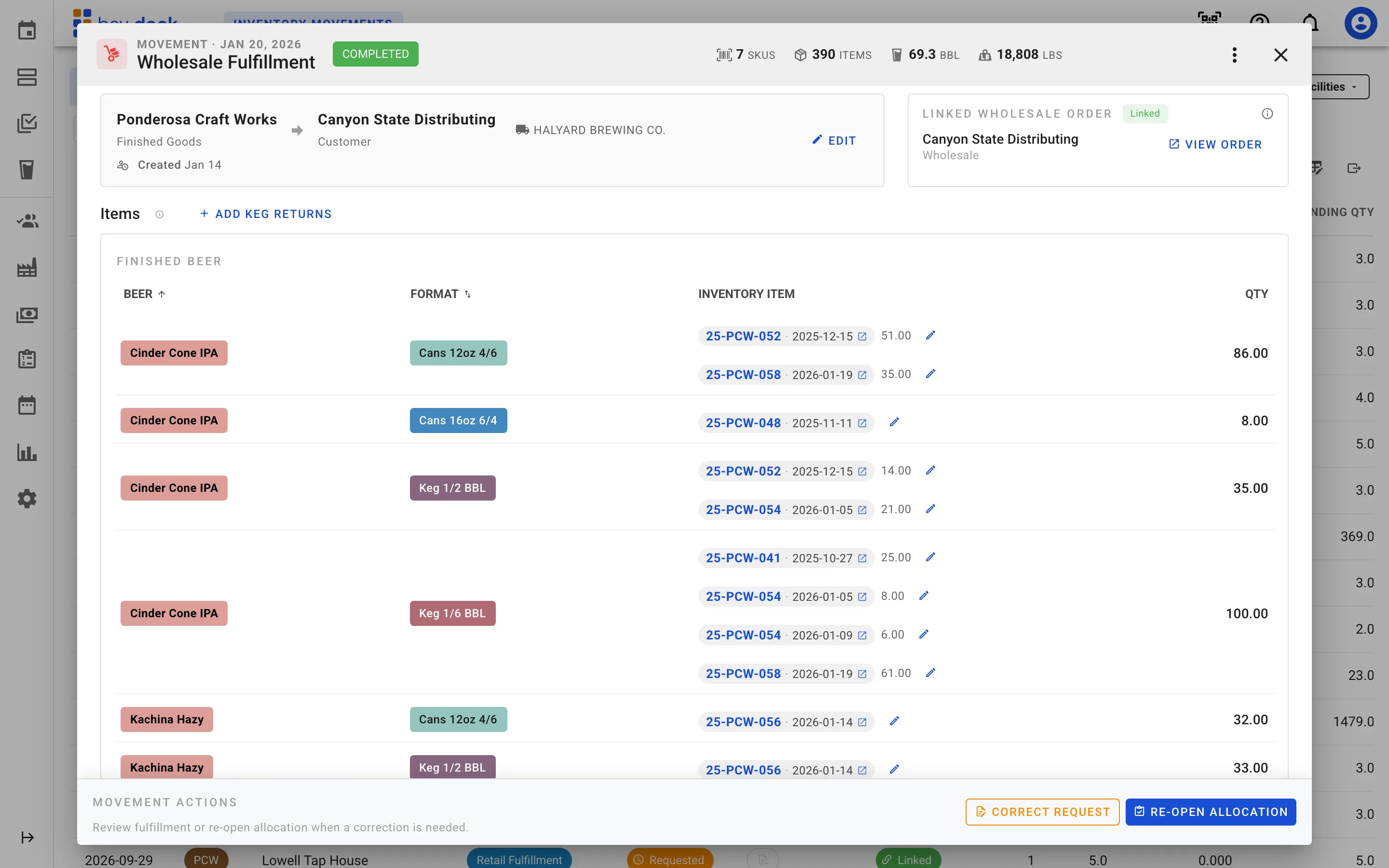
Every invoice line still points at the stock that filled it.
An order raises one fulfillment movement, the movement carries the bill of lading that rode with the truck, and the invoice is projected from the order itself. The figure in QuickBooks and the pallet that left the dock are the same record followed forward, not two systems reconciled by hand.
Sales order
Customer, lines, pricing channel, terms.
Entered once.
Fulfillment movement
One per order.
Proposes the oldest lots; records the ones actually picked.
Bill of lading
Signed consignee.
Kegs out against empties back.
QuickBooks invoice
Re-checked against the order every time you open it.
Projected from the order, not from the shipment
Build the report once, then stop rebuilding it.
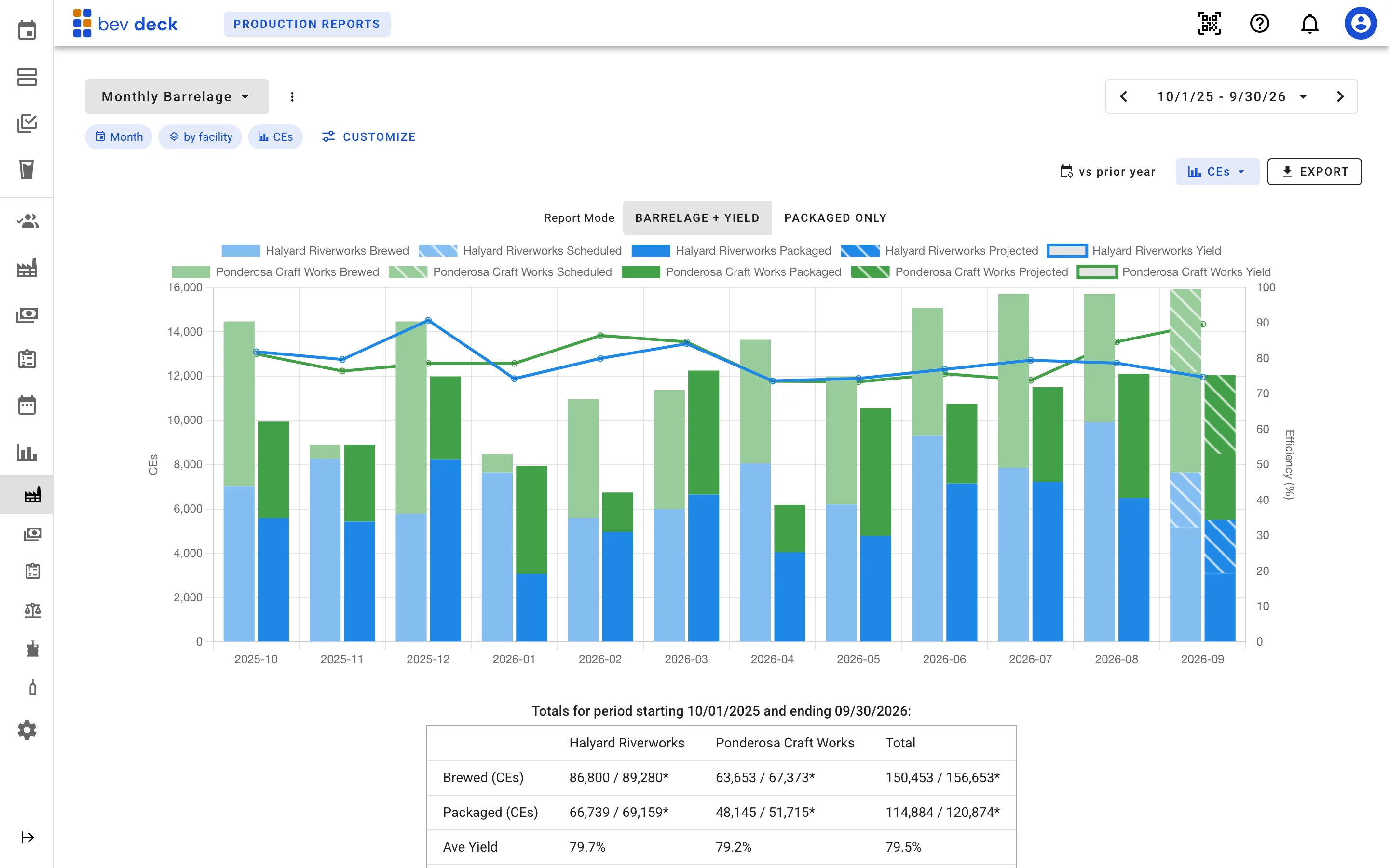
Report configurations save as named views — kept private or shared with everyone at your company, and one can open by default. Every report reads the operational record directly, so production and sales answer on the same axis instead of being reconciled in a spreadsheet afterwards. And every view answers in barrels, case equivalents, or units on one control, so the number on screen is already in whatever unit the conversation is being had in.
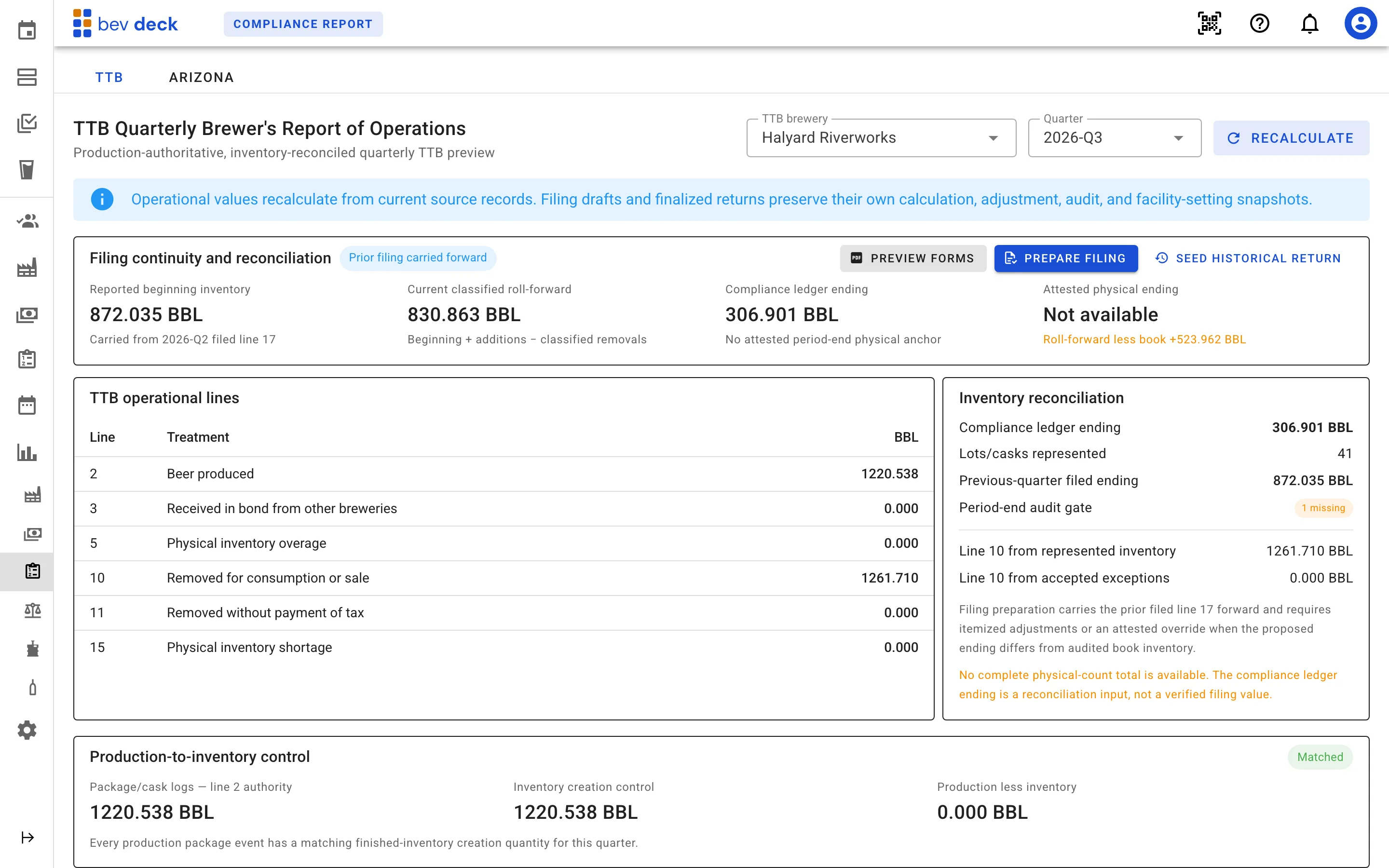
The filing is already written when the quarter closes.
The filings read the same operational records the reports do. The quarter opens at the prior quarter's filed ending, the operational lines come out of production and removals, and the federal form is filled and downloadable — populated rather than transcribed.
Close the loop: what a SKU earns, and what the plant can actually run.
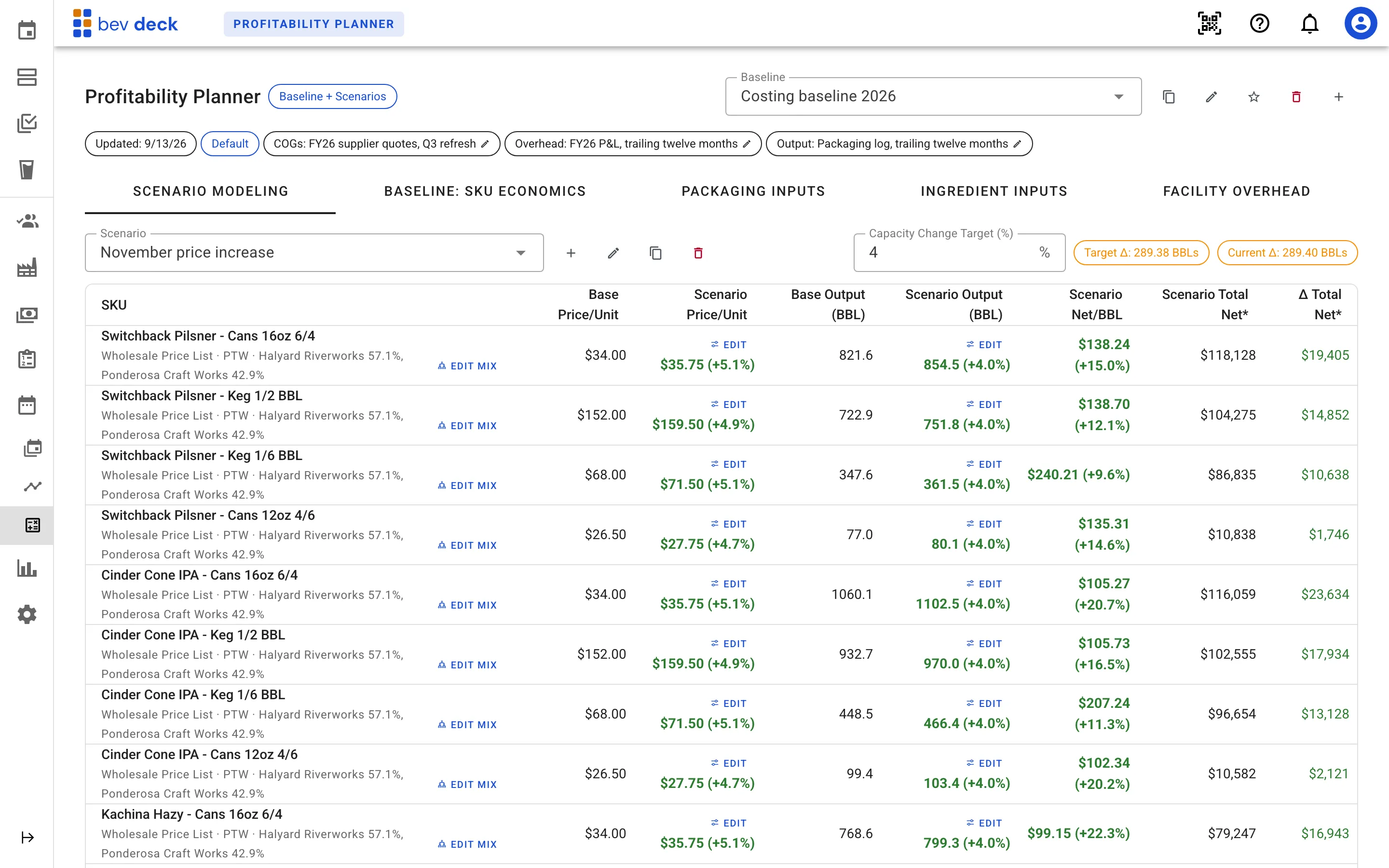
Two reviews that set up the next plan rather than the current week. Most systems built for this industry stop at gross profit. Bev Deck carries ingredient cost, packaging cost, excise tax, and freight down to gross profit per unit, then allocates facility overhead per volume to reach the net profit the SKU actually contributes. Scenarios modelled against a saved baseline test what a price, volume, or facility-split change would do to it. Alongside it, the capacity planner measures what the plant actually ran — tank utilization, turn times, and labor against a working day — to plan production optimizations for your product mix, equipment, and staff.
And the parts of the business that are not on every operation's list.
These run on the same records as everything above, so turning one on does not mean maintaining a second version of your inventory.
Taproom and draft
Square transactions pull daily and map to your SKUs. Kegs deplete by the glass from a service lot, and draft loss lands per keg and per brand.
Barrel program
Barrel inventory with supplier detail and aging duration, filled by rack logs recorded against the batch that went into them, and blended barrel to barrel.
Cask room
Every cask tracked as its own asset through the statuses a cellarman works in, with QR asset and fill tags, and filled-against-returned reconciled per facility.
Keg deposits
Deposits linked to their invoices and mapped to a QuickBooks liability account, debited and credited automatically on shipment and return.
Roles and access
Fine-grained permissions per area of the app, so the person counting the cold room and the person closing the books do not need the same access.
What Bev Deck does not do yet.
The scope is deliberate. Bev Deck is strongest when production is outsourced, or when there are more facilities, brands and partners than one system was built to hold. These are the gaps, so you find them now instead of three weeks into an evaluation.
Bev Deck is built for many facilities. It does not require them.
Set up the facility you run today and add brands, partners and locations as they come — or book a walkthrough and we will map Bev Deck to how you already work.